
Rekordbox Playlists
This is something I've been missing for years now. I want to be able to see in which playlists a track on my drive is included.
For example, if I want to replace a low-quality track on my drive, I currently have to manually check every playlist to see where I need to replace it (e.g., set preparations).
Please make it possible to see in which playlists a track is included when you click on track info. Or perhaps like Spotify: Right-click > Add to Playlist > and then see a ✅ if it's already added.
For example, I have "Fatman Scoop - Be Faithful" in the following playlists:
- Guilty Pleasures
- Set 6 July 2024
- Top Hits
This way, if I remove the track from the USB drive, I know I need to re-add it to these playlists.
Thank you.
Can't find help? Search our Support Site or alternatively, reach out to our Support agents
its been there for years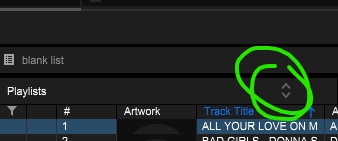
BriChi That's not what I mean
ok but you did mention """Please make it possible to see in which playlists a track is included """" which if you click a track and click the arrows I circled in that picture, it shows you the playlists that track is in
BriChi Strange, I don't see that option on my drive :-(
4 comments