
Rekordbox - track exists in the collection **PLEASE HELP**
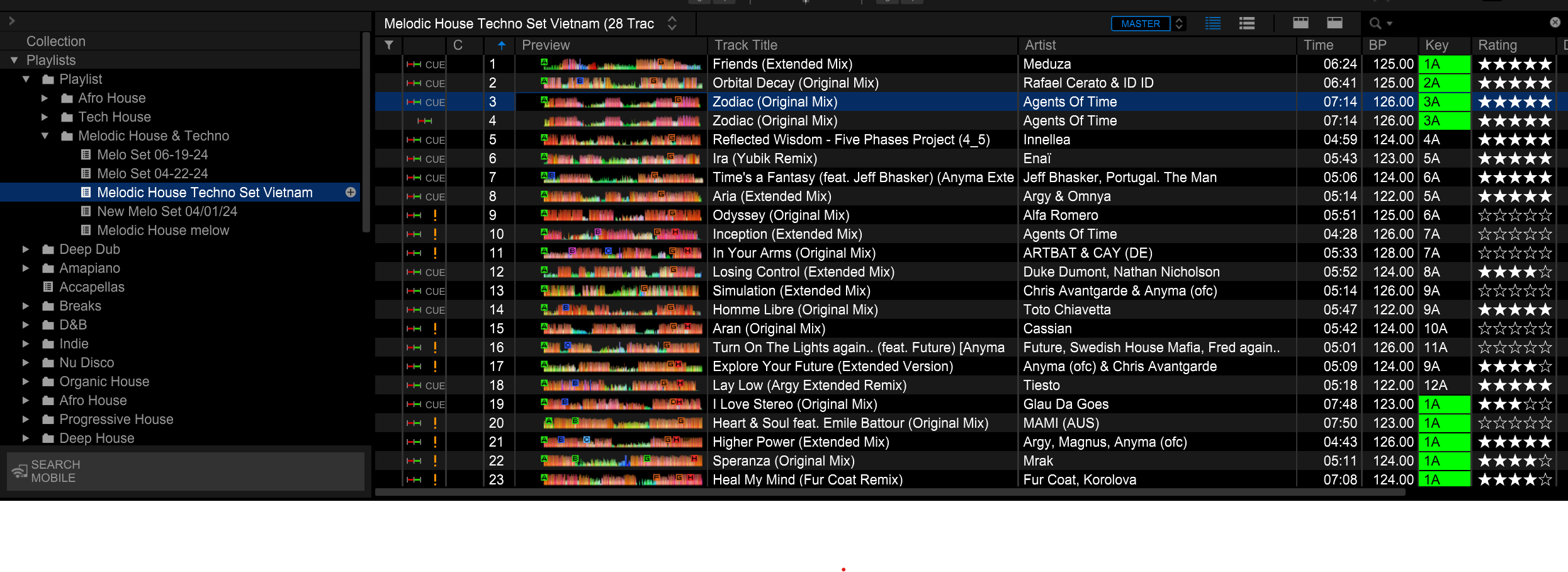
I recently bought a new laptop and therefore, did a back up of my collection on a USB and imported it on my new lap top. The way I work is that for each genre, I have folders and in each folders, I have playlist for each year (2024, 2023, etc). I also creates playlist to prepare for my gigs which is made of tracks in my original folders/playlists. Therefore, it is very possible that one track will be in multiple playlists. Unfortunately, when I relocate the tracks, it only works for one and the other ones wont relocate. Is there a way to fix this without loosing my cues and all ? Like the picture below shows, many tracks have not been located and I assume that this is because those tracks are also in my playlist "melodic house & techno 2023"
Can't find help? Search our Support Site or alternatively, reach out to our Support agents
If rekordbox shows "track is already in the Collection", it means the music file you are going to select to relocate has been imported in the Collection.
Please show the Location column and find the track imported from the new location and remove it from the Collection.
Then relocate the missing track again.
1 comment