
XDJ-AERO not recognized on midi port
Hello, good morning!
Every time I try to connect my XDJ-AERO to Rekordbox 5 or even Traktor 2 via MIDI, I cannot get its official driver (version 1.3 from the website) to be signed to the device when I connect it to my computer. I checked by disconnecting and reconnecting to see which one was the XDJ-AERO in the device manager, and it registered this device highlighted in the image, with Windows returning error 43 due to a driver signature issue. I tried uninstalling, reinstalling, and updating it, but nothing worked.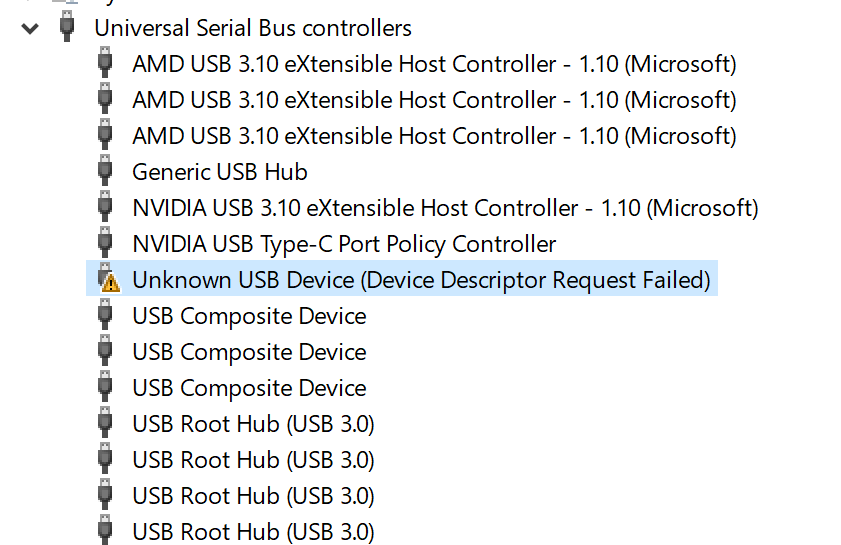
I use Windows 10 and have tested it on two machines (laptop and PC) and had the issue in question on both.
After that, I did everything recommended in the Pioneer forums and the manual. I checked if it was a Windows problem and did everything that could be done (I really did, spent 7 hours on this) and I don't know what else to do. The XDJ-AERO firmware is already updated to version 3.0, and I would really like to be able to connect it via USB to use it on my laptop, as it has more space to store music, and I haven't seen anyone able to solve this until now.
I eagerly await your response! Best regards!
Can't find help? Search our Support Site or alternatively, reach out to our Support agents