
HYULIGHTS - 150W BEAM SPOT MOVING HEAD LIGHT
Bonjour,
j'essaie d'utiliser la fixture existante (150W Mini Beam Spot LED Moving Head / version 3002) mais celle-ci ne se comporte pas correctement.
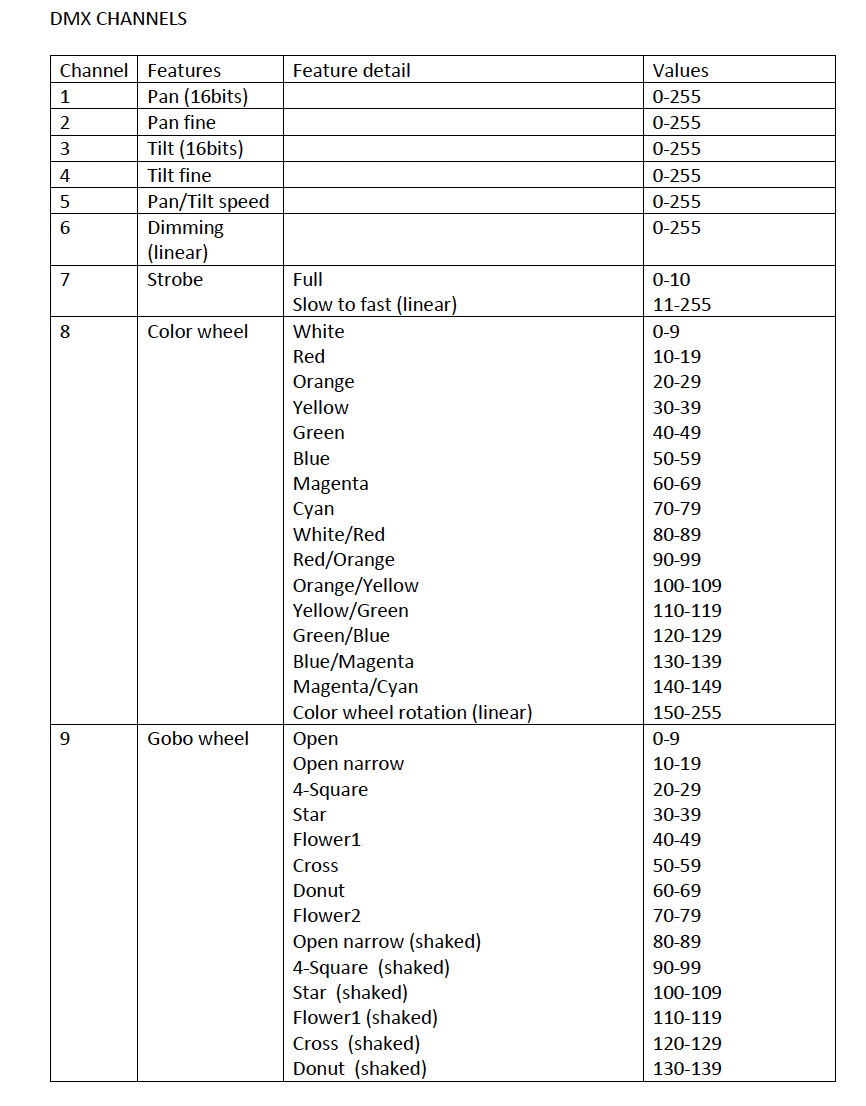
J'aimerais comprendre comment sélectionner les bonnes couleurs parmi toutes celles de la roue en fonction de valeur RGB proposée dans Rekordbox.
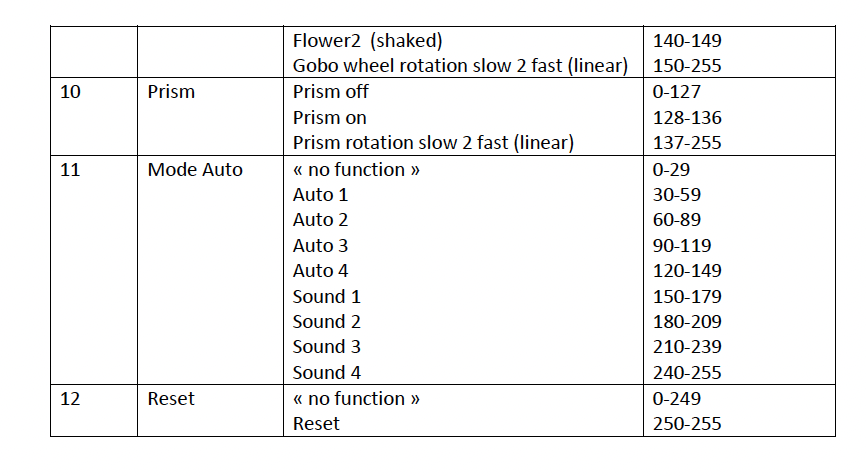
J'aimerais aussi comprendre les valeurs à entrer dans les paramètres GOBO pour avoir tous les gobos notamment les "shaked".
Pour finir, j'aimerais aussi utiliser le canal Prism qui devrait être correspondre au "ROTATE" de Rekordbox.
Est-il possible d'avoir l'export CEF de la fixture pour bien comprendre comment sont adressés les canaux DMX ?
Merci.
Voici la configuration précise de l'appareil :
Can't find help? Search our Support Site or alternatively, reach out to our Support agents
Hello David,
rekordbox lighting engineers answered below.
Your fixture type is "Moving Head."
You can use ROTATE feature only with Laser and some other fixture types, which can rotate the projection angle.
Unfortunately, you cannot use Prism with the Rotate feature.
If you would like to control Prism, please assign "GOBO" dialog number.
Prism has similar features as Gobo.
Please refer to the FAQ below.
Q. How can I control Prism?
A. At the "GOBO" dialog in Editor, assign the number.
Q. Can I use both patterns of Gobo wheel and Prism at the same time?
A. Unfortunately, no, you can't.
Q. If a fixture has multiple Gobo Wheels, can I overlap two different patterns?
A. Unfortunately, no, you can't.
As your fixture have CH8: Color, CH9: GOBO and CH10: Prism, if you would like to control Gobo, you need to assign GOBO number in the "GOBO" dialog in the edit screen.
1 comment