
Rekordbox FLX4 Audio
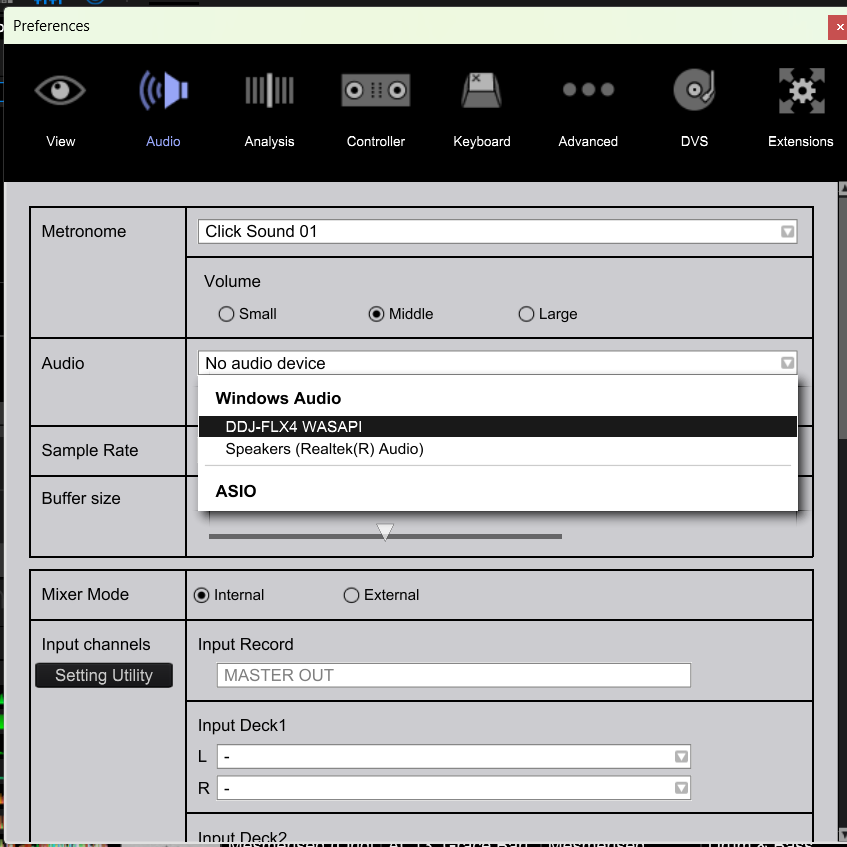
Hi, having trouble with the audio output. I can't select the FLX4 as the audio output in rekordbox.
I can play music through the FLX4 through the laptop, such as Spotify, so FLX4 is connected and working, speakers are connected and working. FLX4 operates rekordbox as it usually does too.
Updated firmware on FLX4 and have up to date software for rekordbox.
Select the FLX4, but it doesn't recoginise it and wont allow it, will select the laptop speakers and work but not the FLX4.
Please sign in to leave a comment.
Can't find help? Search our Support Site or alternatively, reach out to our Support agents
You need following set up on your computer.
Windows 11
From Privacy & security > Microphone, turn on Microphone access.
Turn on "Let apps access your microhone".
Turn on "Let desktop apps access your microphone".
Windows 10
From Privacy & security > Microphone, turn on "Allow apps to access your microphone".
Turn on Allow desktop apps to access your microphone.
2 comments