
Rekordbox 7 Intelligent Cue Coloring
I tried out the new intelligent hot cue feature and found it doesn't quite work for me.
I've turned it off, but when I go to add hot cues now it still puts them in as the colors it learned the intelligent cue playlist. I removed all the songs from the playlist and deleted it, but I would like it to go back to being the default green color. Is there a work around for this?
Side note: I use the hot cues for their colors to mark whats going on in the song ie. intro, build up, break down, vocals etc. Maybe there can be an extra "markers" feature to do the same thing with the colors while having the hot cues be for live pad sampling?
Please sign in to leave a comment.
Can't find help? Search our Support Site or alternatively, reach out to our Support agents
Can you please file an inquiry ticket here and our support team will gather some additional information to assist you in resolving this issue.
The hotcue color presets can be changed in the following preferences.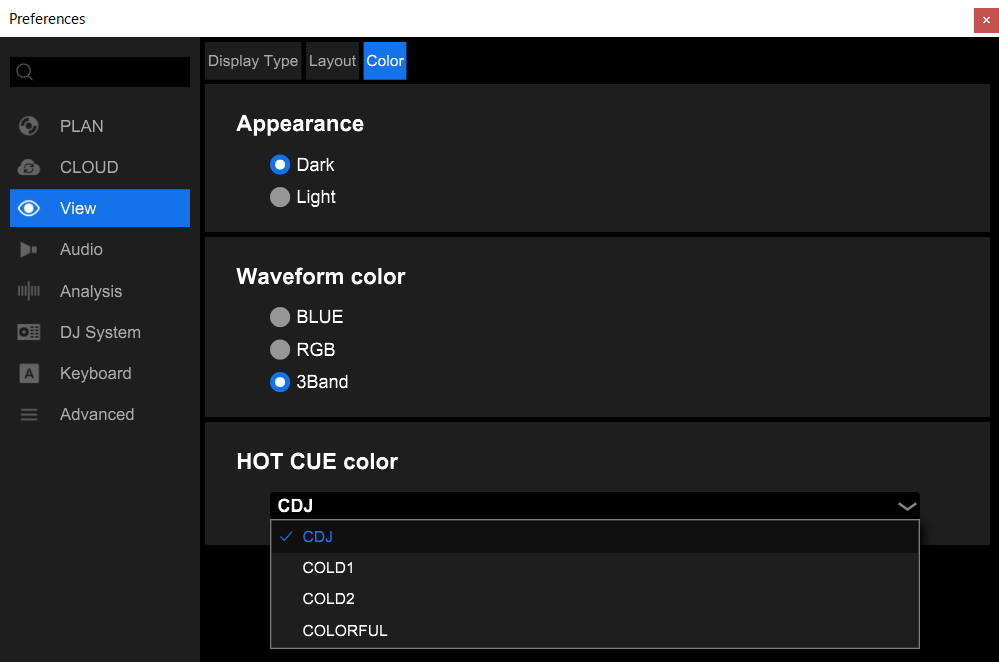
You can also change the color individually by right-clicking the Hotcue button.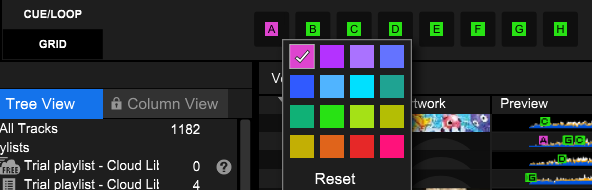
2 comments