
Omnis Duo feature request - software quality of life features
Hi there,
Asking for a few quality of life feature upgrades to the Omnis Duo software interface.
------------------------------------------------------------------------------------------------------------------------------------------------
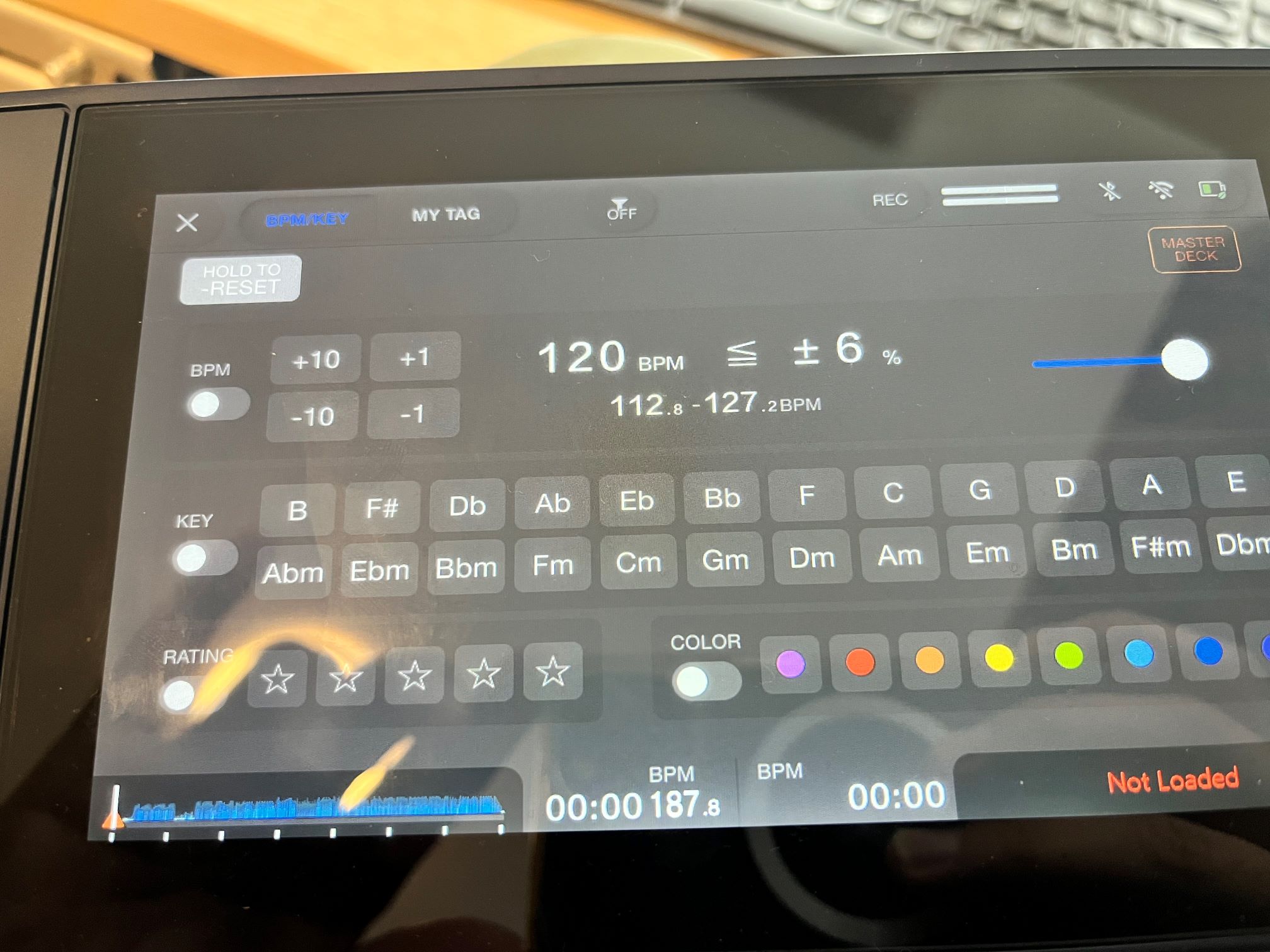
Request 1: Show Key using Camelot notation in Filter Menu.
Description: The Camelot notation is used when browsing through a playlist. Can we make the Filter Menu use the same notation? Having consistency will allow the filter to usable as I can't easily translate between regular notation and Camelot notation. See image below:
------------------------------------------------------------------------------------------------------------------------------------------------
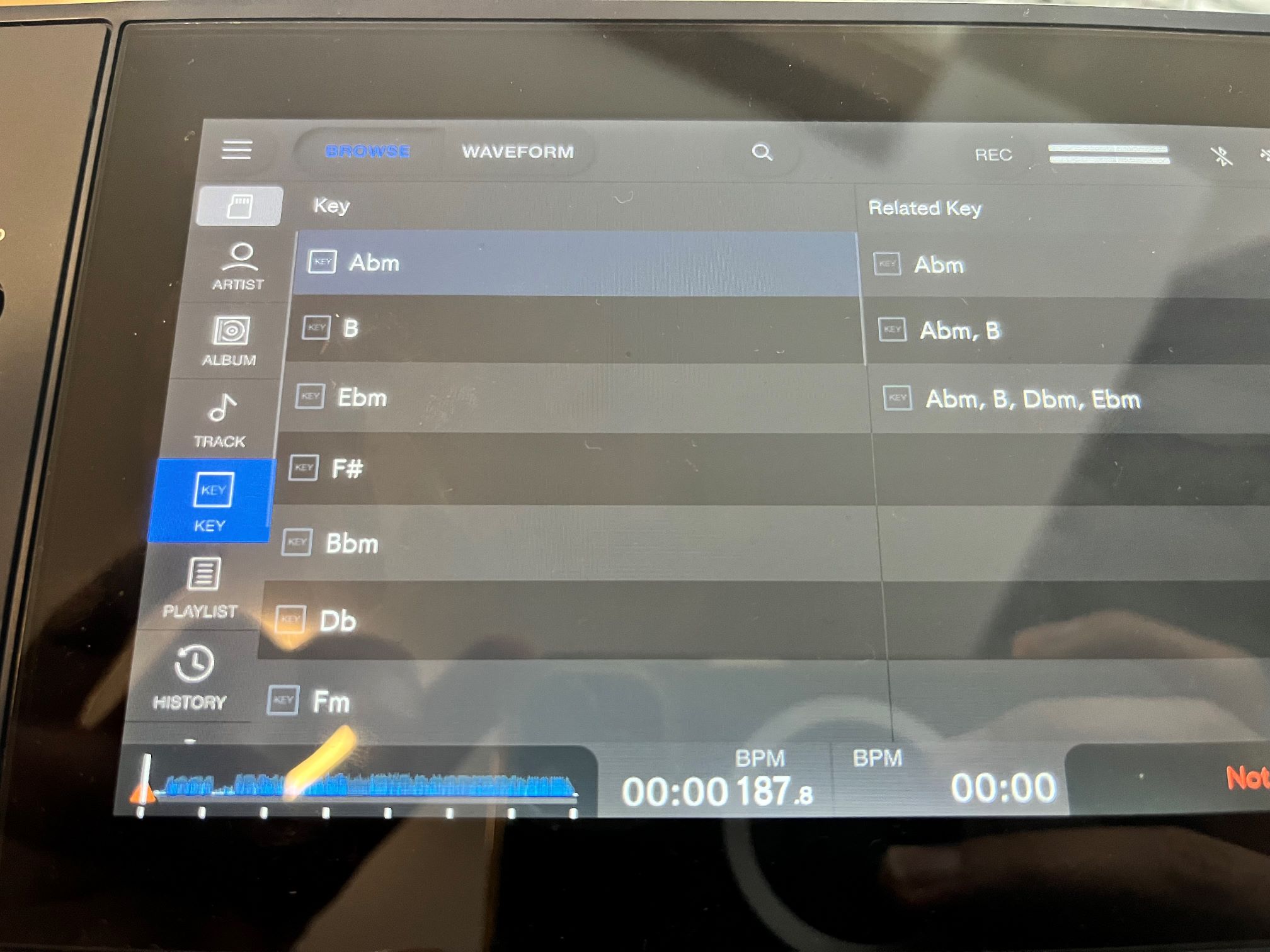
Request 2 - Show Key using Camelot notation in Browse menu, Key submenu.
Description: Similar to Request 1. Can we get consistency across all locations where Key is displayed? In this case the Key submenu in Browse mode uses regular notation, and not Camelot notation.
------------------------------------------------------------------------------------------------------------------------------------------------
Request 3. Add Genre in Browse mode.
Description: Can Genre be added as a sub menu in Browse mode? I heavily use Genre to organise my music. Other Pioneer All-In-One / Standalone devices have a Genre sub menu for navigation. Adding this would make it super easy navigate through my playlist. I am currently using Intelligent playlists to achieve a similar result, but it doesn't offer the same ease of use if the Genre field was used automatically. I have to manually build each Intelligent playlist which takes time and doesn't guarantee I've covered all genres. For context, in my Genre field I enter in a single main genre, and multiple sub genres. E.g. (Drum & Bass | Dancefloor / Neuro). See image for Request 2 to understand where I'd like a Genre sub menu to be added.
------------------------------------------------------------------------------------------------------------------------------------------------
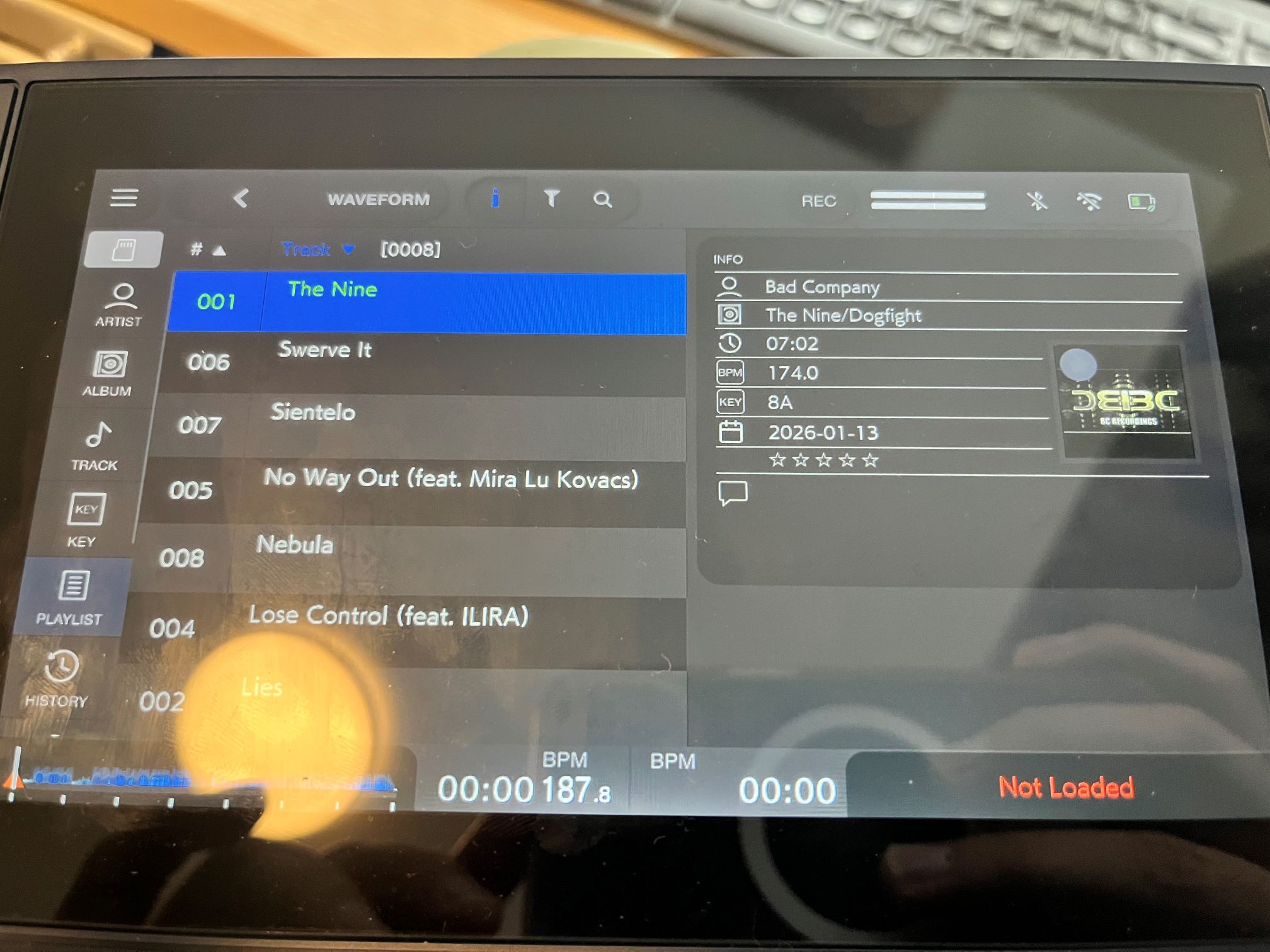
Request 4 - Show Genre in Song Info in Browse Mode/Playlist sub menu.
Description: Similar to Request 3. I use the Song Info page to help assess which song to select and play next. This page shows information such as rating, colour and comments. I would like Genre added to this page, and abbreviated if it's too long.
------------------------------------------------------------------------------------------------------------------------------------------------
Request 5. Implement page up/down in browse mode.
Description: Some of my playlists contains hundreds of songs. Is it possible to implement a page up/down feature by holding shift and using the rotary browse knob? So for example Shift + rotate browse knob left = page up.
------------------------------------------------------------------------------------------------------------------------------------------------
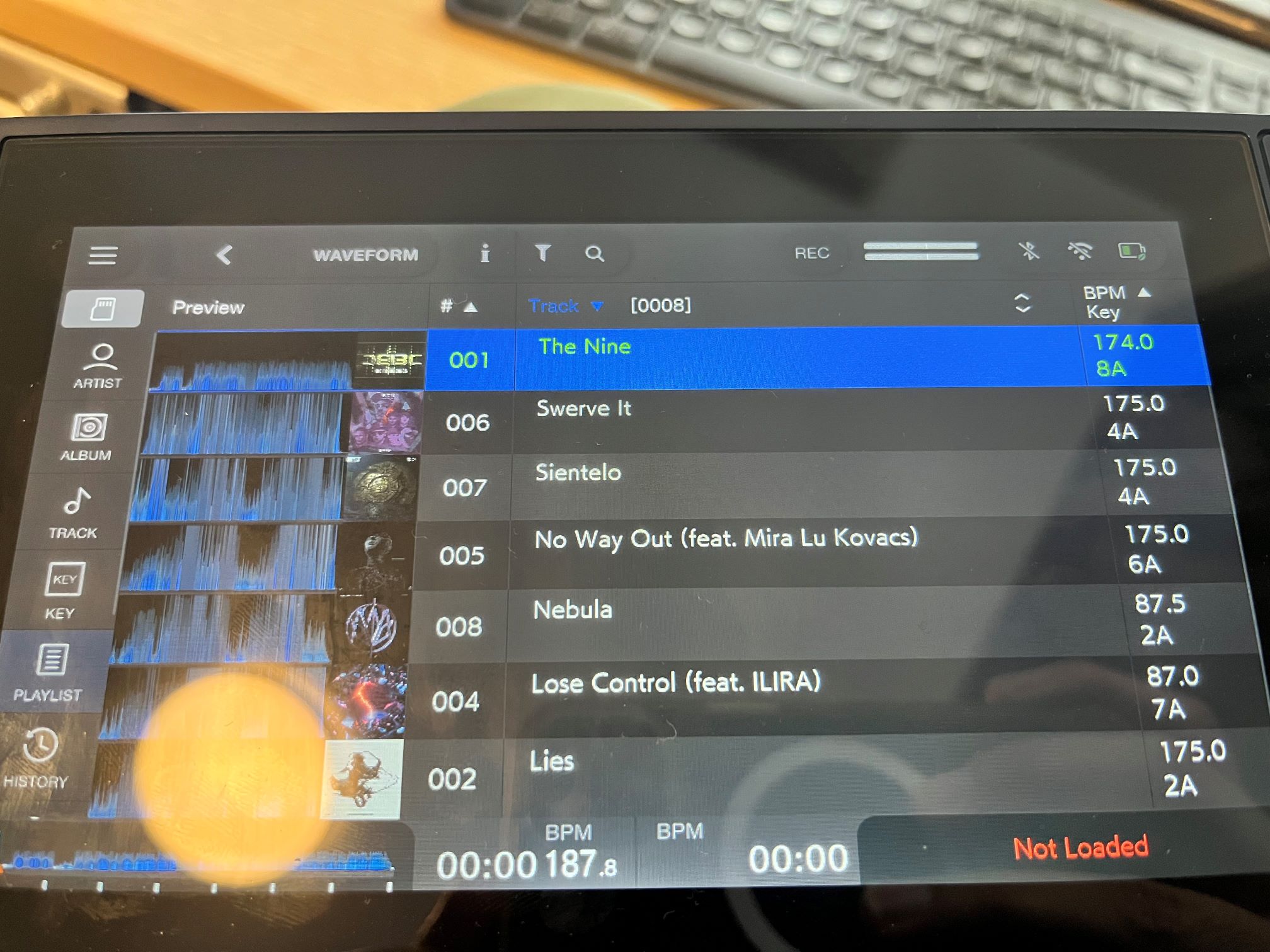
Request 6 - Show Playlist title inside Browse submenu.
Description: I have many playlists that I create, and access during a set. Would be nice to know which playlist I am browsing when in 'full screen mode' in the Playlist sub menu. This is easily forgotten after playing a few songs. It would also save time by avoiding going back into the main Playlist sub menu to see what I had selected. Could the playlist title be placed next to the track count at the top? If the name is too long, can it be abbreviated automatically?
------------------------------------------------------------------------------------------------------------------------------------------------
Request 7 - Edit Colour.
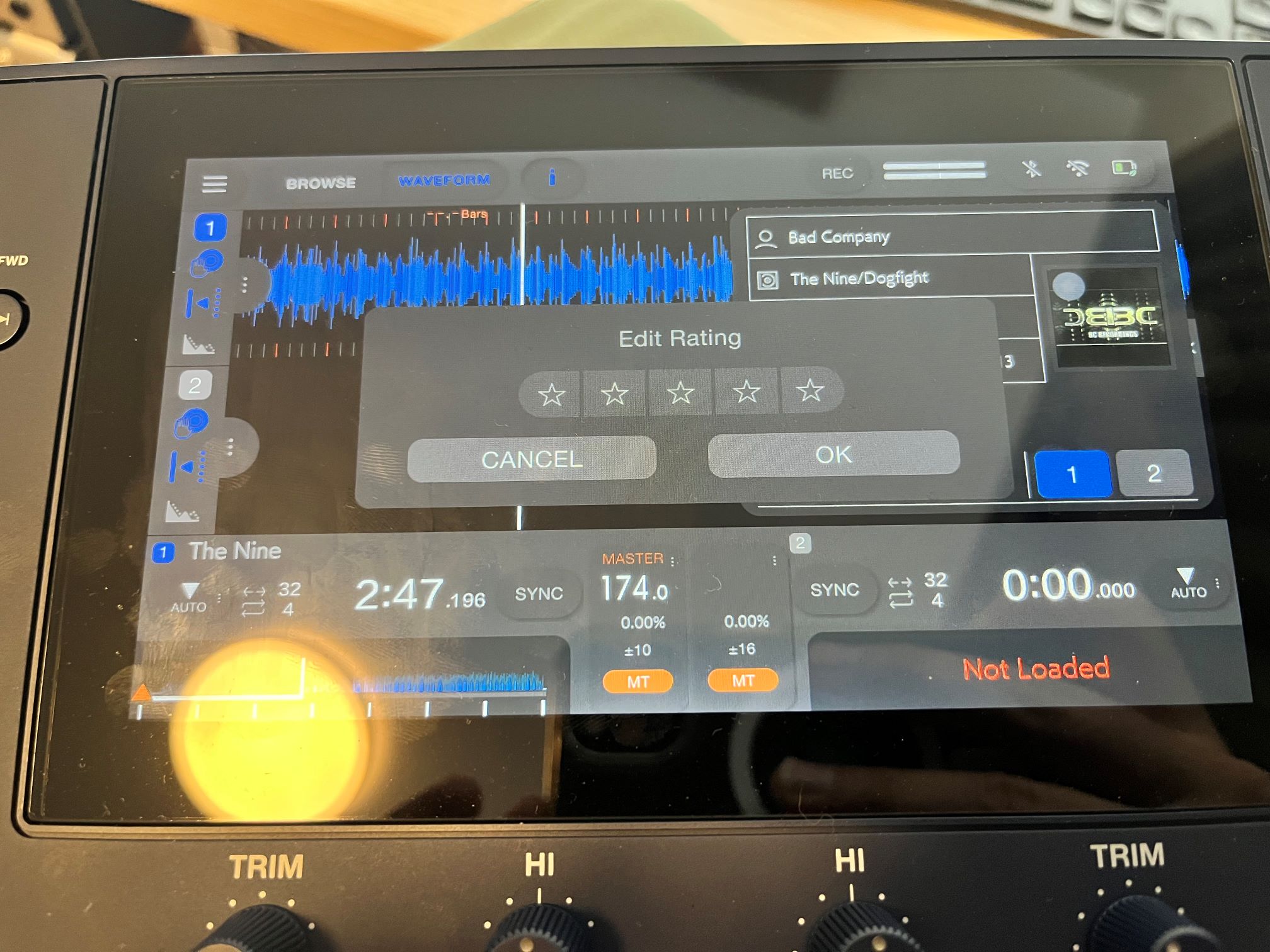
Description: When playing I continually evaluate the energy rating of a song using the Star/Rating field, as well as determine which part of a set it belongs to using Colours (e.g. Red = Peak, Orange = Build Up). The Omnis Duo allows you to edit the rating, but not the Colour. Could we be able to edit the Colour and Rating at the same time?
------------------------------------------------------------------------------------------------------------------------------------------------
Can't find help? Search our Support Site or alternatively, reach out to our Support agents
To sort by Genre (or other things), you have to set that up in Rekordbox. Click your USB Drive in rekordbox, and in one of the tabs you can select what sortings you want (like Genre).
Also, a big missing feature is that cues and beatgrids for Apple Music are NOT saved on the USB drive/SD Card, it's reset every time you turn off the device. The Denon Prime Go does it !
Thanks chpouky .for the tip - hopefully the team can implement the features requested above relating to Genre. Sorting inside Rekordbox doesn't solve the usability problem I have.
Do you want to set up a separate thread for your Apple music request - this looks like a major request and deserves it's own thread.
2 comments