
REKORDBOX 7.2.16: Dialog Box Issue
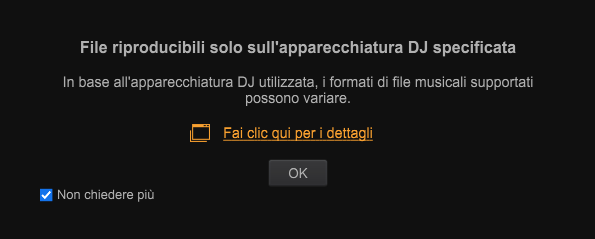
A dialog box about DJ controller compatibility keeps popping up even though I've checked the “Don't show again” box, and I can't export my playlists to USB.
Please sign in to leave a comment.
Can't find help? Search our Support Site or alternatively, reach out to our Support agents
Can you please file an inquiry ticket here and our support team will gather some additional information to assist you in resolving this issue.
Done.
I have this same issue starting with this release and continuing with 7.2.17
AlphaTeta support solved this issue by applying a patch to the rekordbox3.settings file located at this path
WindowsRoaming\Pioneer\rekordbox6\rekordbox3.settings
Application Support/Pioneer/rekordbox6/rekordbox3/settings
C:\Users\username\AppData\
*AppData is hidden folder by default. You can show hidden folders in the View menu of Explorer.
Mac
/Users/username/Library/
by using the value 70219 at these lines:
Enjoy!
So far that seemed to work. The first time I edited the file it seemed to only update the one line. I re-edited the file and it stuck that time. I edited both times with RB closed. Thanks for the fix!
Glad to help you
6 comments