
DJX won't read my flash drive but my cdjs do
Djs: I spent a bunch of time prepping a brand new, never used flash drive in rekordbox and it works fine in my cdj2000nx but when I tried to use it at a gig last night in a pioneer djx it wouldn't read it.
It's a lexar 128g usb3 fat32. Any idea why? All it said was "no usb" no errors or anything. Some people are saying you cant use anything larger than 16gb for any dj controller or cdj but if thats the case why does alpha sell a 1tb drive? Im a serato user and this is why I dont like using flash drives or any pioneer gear. Also I just downloaded rekordbox 3 days ago so I assume its the current version. Most people say I need to "update my rekordbox". The dj before me drive worked fine
Please sign in to leave a comment.
Can't find help? Search our Support Site or alternatively, reach out to our Support agents
HI there,
Not sure what products you're referring too as we don't have a 'DJX'. You may have meant XDJ-***, was it the AZ?
If so, the USB drive needs to have Device Library and One Library (device library plus).
You can check this in rekordbox, One Library should show underneath the Device Library in Display Devices tab.
Please check the FAQ on One Library below -
https://rekordbox.com/en/support/faq/onelibrary-7/
It's a djxrx when i exported to my usb there was no option to do the old library which I assume I need. How do I turn off one library and have it export the old way so it works on older equipment?
Hi there,
What format is the drive?
If it's the XDJ-RX, you need to formatto either FAT32 (Windows) or HFS+ (aka Mac OS Extended).
I included that information. It's fat32
How do we export using the old library system when its a new drive and newest version of rekordbox? No one can answer that simple question, that seems to be the issue. The rx cant read the new system
Please see here - https://forums.pioneerdj.com/hc/en-us/community/posts/115000209026-USB-3-0-not-recognized-in-Rekordbox-and-XDJ-RX
It says the answer is the formatting but like I said its formatted fat32 and it works in my cdj2000nx
Is it FAT32 with a Master Boot Record (MBR) scheme?
Why won't anyone tell me how to just use the old library system? Seems like everyone hates the new one. This is why I'm a Rane user and cant stand pioneer
The older library system still exists as 'Device Library' in the display devices tab.
How do i export using that instead?
https://cdn.rekordbox.com/files/20260317132052/OneLibrary-Compatible-USB-Device-Export-.pdf
This is on a brand new drive with a new copy of rekordbox so its never had the old system on it. That id about them not matching up but I dont have the old system at all on my drive. Why is there no phone support?
Also that says its for the new system and people that are using the 3000
So are you saying that Device Library does not show for you, like it does here?
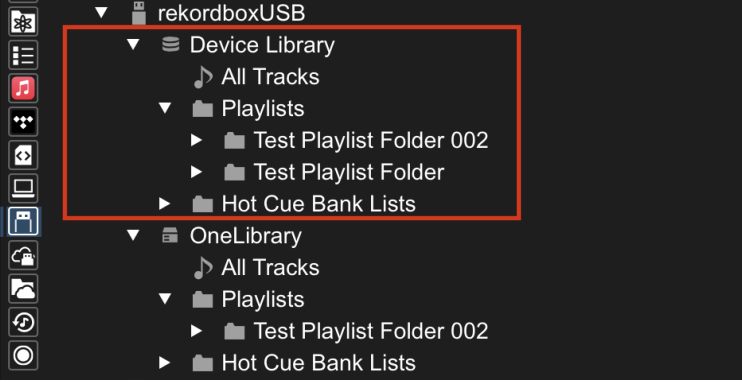
I dont have the drive on my at the moment but if the old library is on there shouldn't it of worked in the controller? It's my understanding that the whole reason its not working is because I used the new system and new version of rekordbox and i nees to be going back to the way they used to do it.
It's difficult to know for sure. Given that other users have had issues with that particular USB drive, it could be the drive itself is the problem.
How are we supposed to know what to use then? Do they only work with the overpriced alphatheta one now? The one I got had thousands of good reviews and people are saying 1tb is way too big for rekordbox so I'm not gonna buy the AT 1tb. Im a laptop dj this is only in case I'm stuck using a dumb pioneer controller again in the future.
Can you please file an inquiry ticket here and our support team will gather some additional information to assist you in resolving this issue. Please send over the .PIONEER folder from the USB drive so we can take a look at it's contents. Please also send a screen shot of the 'Properties' window of the Device in Windows Explorer
Did the inquiry over a week ago. Only got a generic response about using the latest firmware etc
Im using a MacBook
21 comments