
"Load error. Check your audio settings" DDJ-FLX4
Hello,
I have this error problem when I load music into rekordbox: "Load error. Check your audio settings", but only when I select "DDJ-FLX4 WASAPI", when I select "MAIN Left/Right (Minifuse 2) " or "Haut-parleurs (Realtek(R) Audio)" or "MiniFuse ASIO Driver", it works.
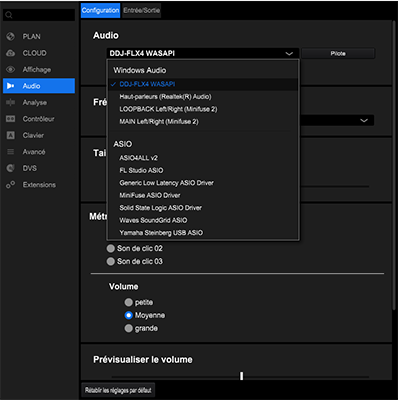
This could suit me but the problem is that I don't have the headphone output of the FLX4, so is this already normal? That is to say that it is possible to have the headphone output only by selecting FLX4?
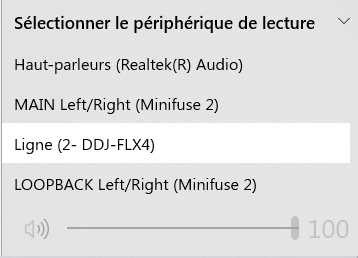
When I select "Line (2- DDJ-FLX4)" in the windows device, no sound comes out of the controller's headphone output.
Maybe it comes from the drivers but when I go to the derivatives site, they say that:
"You don't have to install extra driver software.
Windows/macOS standard audio driver will be automatically installed when DDJ-FLX4 is connected to your PC/Mac with a USB cable."
They only allow you to install an update, which I did but nothing changed.
https://www.pioneerdj.com/fr-fr/support/software/ddj-flx4/
I found this too but couldn't get it to work properly.
https://faq.pioneerdj.com/files/img/Troubleshooting_001_E.pdf
Can't find help? Search our Support Site or alternatively, reach out to our Support agents
Hi. I have exactly the same problem, just as you have explained.
I can't find a solution. I have sent an email to Pioneer but they have not responded.
Please, someone who can comment on a solution.
Thank you.
Same problem here. Following
Hi maxime durand
Can you please file an inquiry ticket here and our support team will gather some additional information to assist you in resolving this issue?
Thanks
Yves
I am having the same issue, had anyone found a solution?
I've also been having the same issues. Have been fiddling with different Input/Output options and still nothing. Even tried enabling and disabling my mic. Also just keep getting hit with the 'Load error, check your audio settings'. Anyone found a fix yet?
After having this exact problem for over two days and trying every combination of mic settings, Window sound settings and rekordbox settings I almost gave up.
I decided to try my partners Thinkpad which is a couple of years older than my one and the controller worked right away. So at that point I knew it was my Thinkpad which was the problem.
So I stared to try and match all of the Windows audio settings from their PC with mine. In the end it was my PC's headphone device that was blocking the connection/PC Master Out from appearing. Once I disabled it everything worked perfectly. PC Master Out appeared in rekordbox and I was able to hear the audio from my PC speaker and also the audio in my headphones from the controller.
This seems to be a common problem with many different solutions. I'm not saying this will work for you but hopefully something extra for you to try.
Have the same problem.
I have already checked microphone settings (Privacy).
Following up about 2 months later, there is no solution to this problem for me. Support flat-out gave up on me. Here's what they said, after many delayed and feeble troubleshooting attempts:
"Thanks for your patience while our engineers investigated -- they feel that there may be an HID communication error with your original computer and regret that this is beyond the scope of our support to resolve. "
I recommend another software package like DJay Pro.
i had this exact same issue, but finally managed to fix it.
firstly ensure that within 'microphone privacy settings' that 'let desktop apps access your microphone' is enabled
if that doesn't fix it, go to:
conrol panel > sounds > right-click microphone > properties > advanced > uncheck enable audio enhancements
conrol panel > sounds > right-click dj controller > properties > advanced > uncheck enable audio enhancements
while in same menu area ensure both microphone & dj controller are *not* set to default
In the process of diagnosing, i had unchecked "allow applications to take exclusive control of this device" and "give exclusive mode applications priority" for the flx4 under playback and recording tabs in the old sound control panel. When i rechecked them, the flx4 magically showed up as an audio and headphone output device (yay). Since those are on by default, and i was getting blank pulldowns to choose outputs, i think it was disabling all the sound enhancements (they are both in the old sound control panel and new settings), and uninstalled all the dolby slop lenovo installed on this laptop (thinkpad T16s) but on my old thinkpad that didn't have this problem.
10 comments