
"Load error. Check your audio settings" DDJ-FLX4
Hello,
I have this error problem when I load music into rekordbox: "Load error. Check your audio settings", but only when I select "DDJ-FLX4 WASAPI", when I select "MAIN Left/Right (Minifuse 2) " or "Haut-parleurs (Realtek(R) Audio)" or "MiniFuse ASIO Driver", it works.
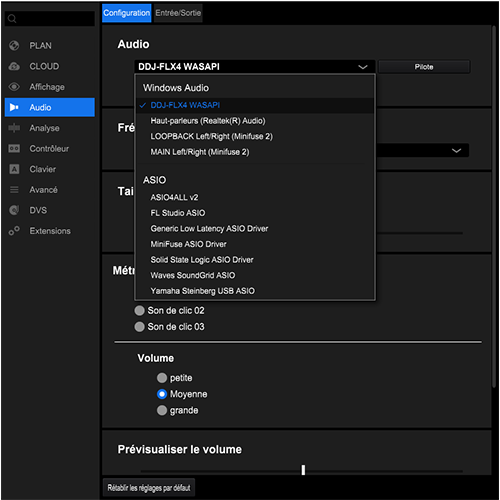
This could suit me but the problem is that I don't have the headphone output of the FLX4, so is this already normal? That is to say that it is possible to have the headphone output only by selecting FLX4?
When I select "Line (2- DDJ-FLX4)" in the windows device, no sound comes out of the controller's headphone output.
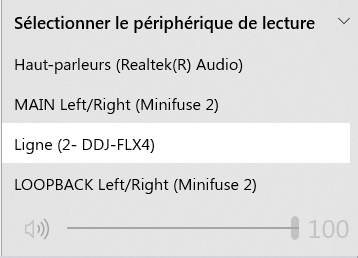
Maybe it comes from the drivers but when I go to the derivatives site, they say that:
"You don't have to install extra driver software.
Windows/macOS standard audio driver will be automatically installed when DDJ-FLX4 is connected to your PC/Mac with a USB cable."
They only allow you to install an update, which I did but nothing changed.
https://www.pioneerdj.com/fr-fr/support/software/ddj-flx4/
I found this too but couldn't get it to work properly.
https://faq.pioneerdj.com/files/img/Troubleshooting_001_E.pdf
Can't find help? Search our Support Site or alternatively, reach out to our Support agents
Are you using Win 10 or 11?
From Privacy & security > Microphone, turn on Microphone access
Turn on "Let apps access your microhone"
Turn on "Let desktop apps access your microphone"
Thanksss!!!
DJ LOUVA
3 comments