
"CLEAR" button under Search not present in Opus Quad and XDJ-AZ
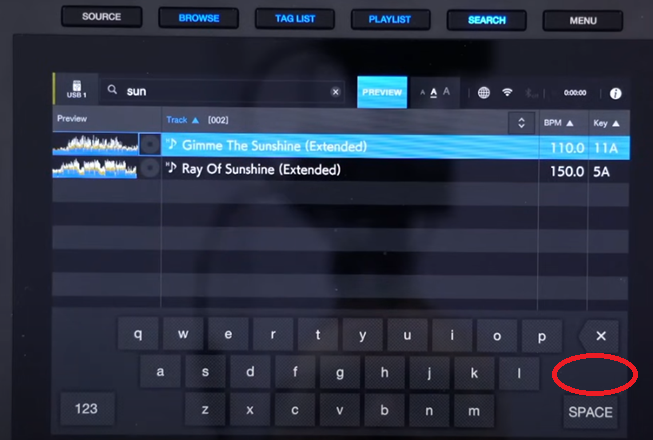
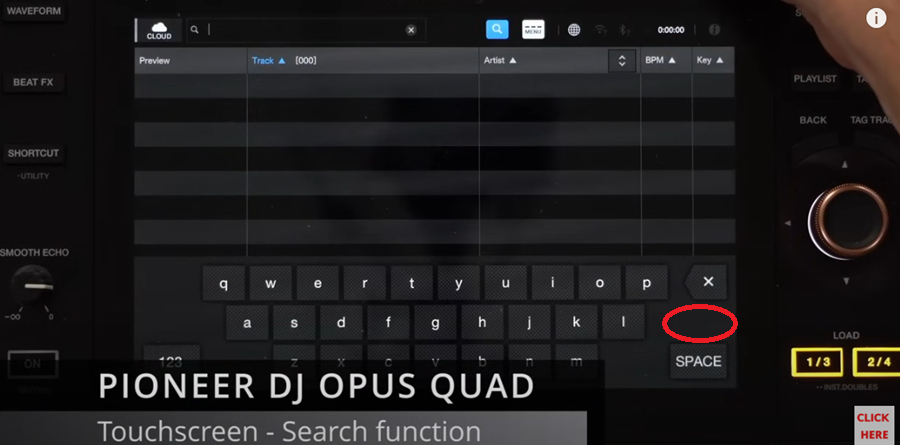
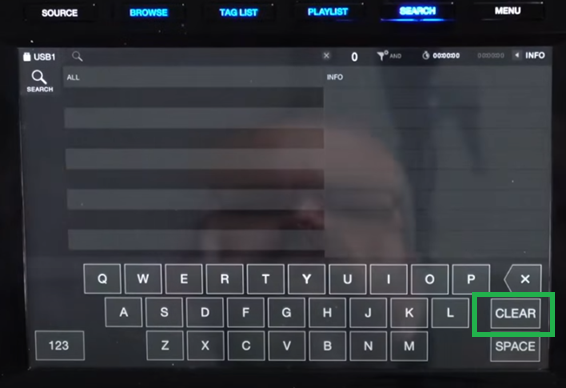
The search area of Opus Quad and XDJ-AZ doesn't have a "CLEAR" button to clear the text like XDJ-R3:
XDJ-AZ:
Opus Quad:
XDJ-R3:
Is there any particular reason why Opus Quad and AZ doesn't have this button? It's quite useful to clear the full text with in a single click instead of pressing multiple times on the "X" button.
Regards,
Paulo Passos
Please sign in to leave a comment.
Can't find help? Search our Support Site or alternatively, reach out to our Support agents
If you touch the white circle with an "X" below, I think everything will disappear.
i miss the clear button too! lol.
yes you can hit the "X" up top but its small and i feel like i have to aim a few times to hit it right (thats what she said)
PLEASE bring the clear button back to the main keyboard!
In v1.21 and later, if you hold down the backspace button, the letters will disappear one by one.
Is this still not enough?
The small "x" on top works but it's tool small while the "X" button also works but it removes one letter at a time...It would be much easier if they had place the "CLEAR" button, there is enough space for it, as there is for Opus Quad and RX3, I don't understand why they have removed this button, it doesn't make sense...
4 comments