
S11 use 44100HZ!!
How can I use 44100HZ on S11? The S11 setup utility only has a fixed 48000HZ and cannot be set to 44100HZ in DJ software. I just need to know how to make the ASIO work at 44100HZ. Don't tell me that 48000HZ is not much different from 44100HZ, because I have to set it to 44100HZ in ASIO mode to use. 48000HZ is on my computer, and after connecting to DJ software, I need to set a larger delay, but if the delay is too large, there will be a delay when scratching, so I have to set it to 44100HZ in order to SCRACH with a lower delay. I hope you can help me solve this problem!!!
Please sign in to leave a comment.
Can't find help? Search our Support Site or alternatively, reach out to our Support agents
Is there no one to help?48000Hz is the only Sample Rate that can be selected when DJM-S11 is connected to DJ software as rekordbox.
A mixer such as DJM-A9 can select other sample rates, but it's the specification of DJM-S11.
But I need the option of 44100Hz, can you tell me how to achieve using 44100Hz in other ways? For example, modifying the registry or something?I really hope the official can help me! thank!!
DJM-A9 has three options of Sample Rate.
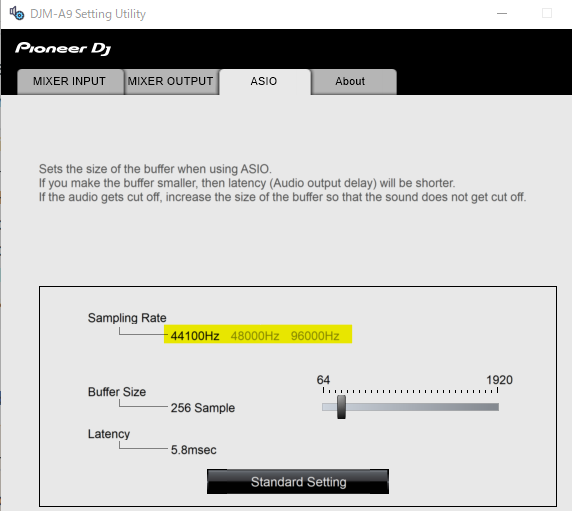
But DJM-S11 has only one, so it is not possible to change it.
It has been added to the feedback list, but due to the specification of the DJM-S11, probably it's not possible.
I really hope the official team can release an upgraded version of the driver settings page for S11 that allows for the selection of 24bit and 44100HZ sampling. This is something I really need! Both the DJM900 and A9 CDJ ASIO sound card drivers allow for the selection of bit and sampling, so why can't the S11 sound card driver do the same? I really don't understand. I hope the official team can take my request seriously!!!! Thank you.
5 comments