
XDJ-AZ Record to USB – Waveform gets compressed
Hey everyone,
I’ve noticed a strange issue when recording directly to USB on my XDJ-AZ. During playback of the recorded file, parts of the audio are heavily compressed — regardless of the channel levels (tested with both -12 dB and 0 dB).
What’s really odd: as soon as I’m mixing two tracks, the audio sounds fine and isn’t compressed. But the moment I fade one track out and leave just a single tune playing, the recording gets compressed again.
Because of that, the recordings are inconsistent and basically unusable.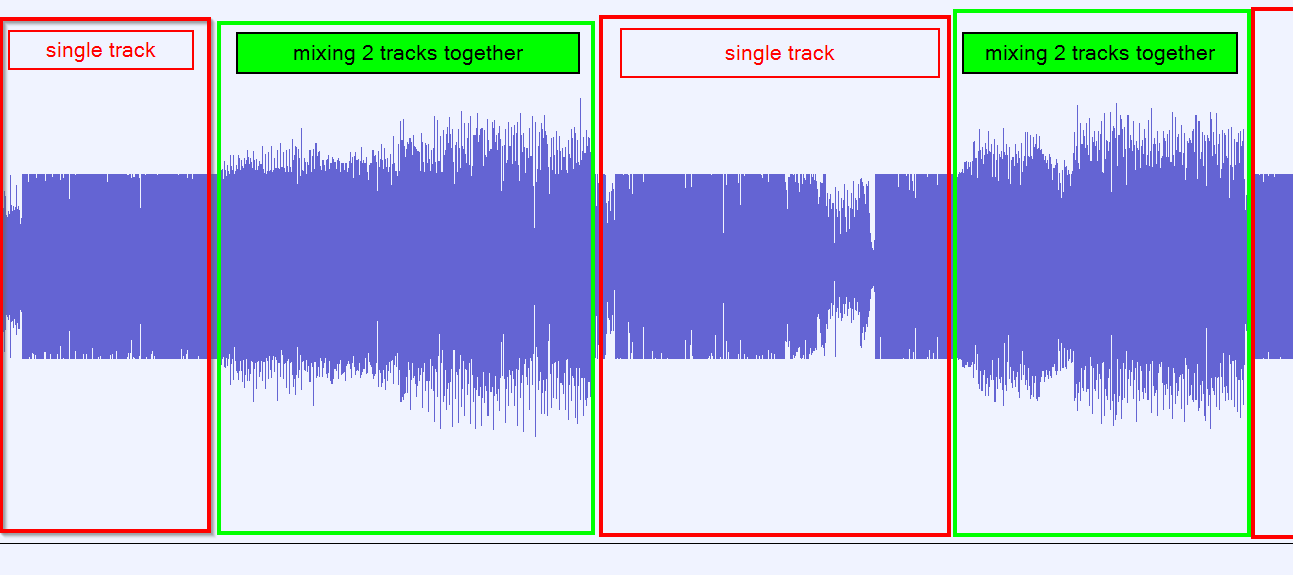 There are no settings (like Auto-Gain in Rekordbox) to adjust for this.
Has anyone experienced the same issue or found a solution?
Please sign in to leave a comment.
Can't find help? Search our Support Site or alternatively, reach out to our Support agents
Please let us know if the result of recording is the same with any USB drives and if it occurs with both USB ports on the AZ.
Is the audio from Master output and headphones are behaving the same or only happens to the recordings?
I'm recording out of the USB C port with a new USB C cable to my Samsung cell phone on the XDJ-AZ. Output levels are below orange on meters. After about a minute when getting deck 2 ready to mix its like the crush effect or saturation affects the entire mix ( effects are turned off at this point). It will be like that for a few moments and then go away. I had the issue while using firmware version 1.22 and just updated to ver. 1.30 and still doing the same thing. Any other ideas to fix that?
2 comments